
ABA billing software should do more than send claims to payers because, for clinics, the real value is catching billing problems before they become denials or rework. Either of these can lead to delayed cash flow and confusion in the office.
This guide breaks down how to find the right ABA billing software for you, including what to ask vendors and how to evaluate a billing workflow built for ABA.
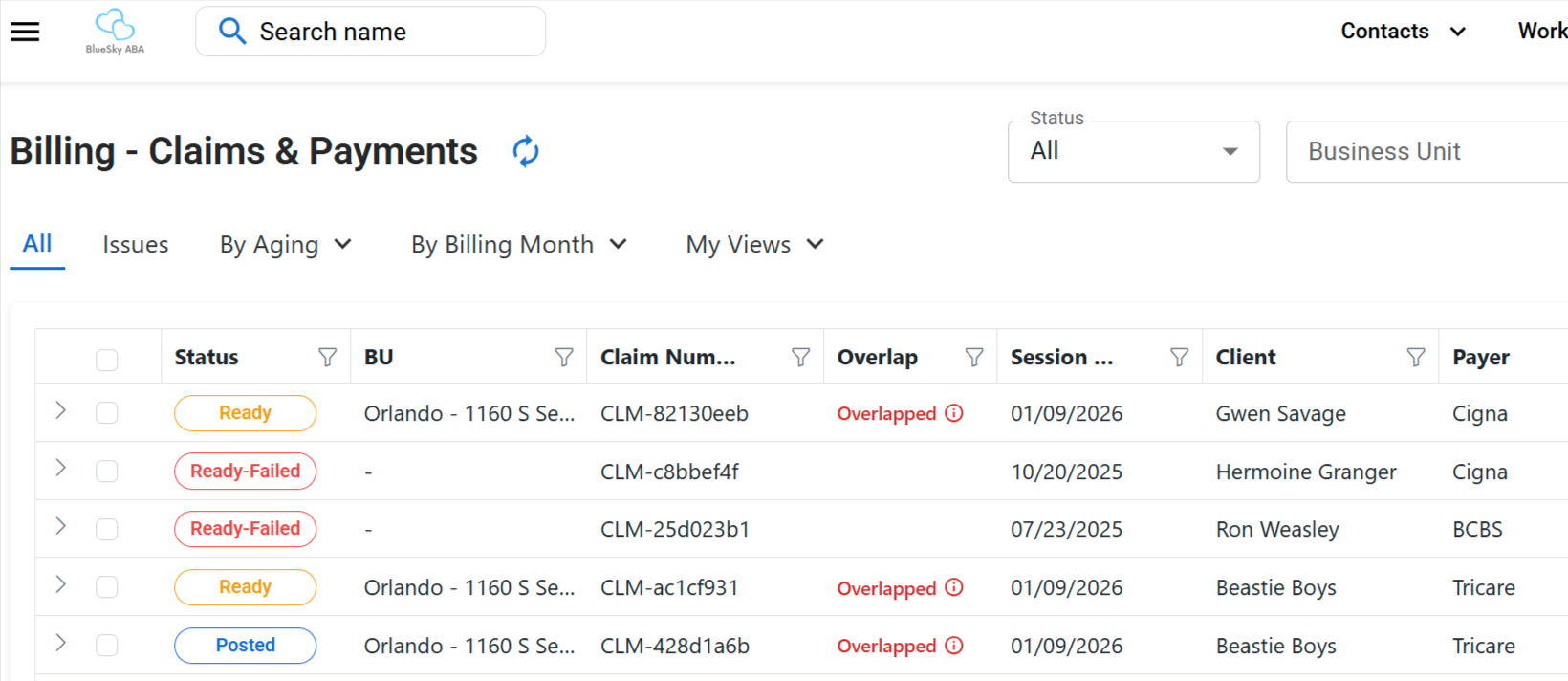
ABA billing software helps autism clinics create, validate, submit, track, and reconcile insurance claims for ABA services.
The strongest systems connect scheduling, session notes, authorizations, payer rules, claims, payments, and accounts receivable in one place. By checking for problems before submission, they reduce the manual rework that slows clinic cash flow.
At the very least, a capable platform should handle:
ABA billing carries rules that general medical billing tools can’t usually handle well. The details below decide whether a claim gets paid.
The takeaway: an ABA billing system must understand these workflows, rather than just push claims out the door.
Most denials trace back to a handful of repeat offenders.
These are the points where ABA billing workflows tend to fail:
These breakdowns carry a real cost. The American Hospital Association reported that hospitals and health systems spent an estimated $19.7 billion in 2022 trying to overturn denied claims, and that nearly 15% of claims submitted to private payers are first denied. This is a healthcare-wide figure, not an ABA-specific one, but it points to the same pattern ABA clinics face. Every preventable denial adds rework, delays payment, and ties up staff time that cleaner workflows could save.
The Operator’s Rule
Discovering a billing issue after a claim submission is too late.
A clean claim is complete and accurate, ready for payer review without preventable errors. By the time a claim reaches a payer, the work that decides whether it gets paid is already done.
Here’s a checklist you can go through before anything goes out:
This is the idea behind audit before denial. Catch the gaps while they’re still easy to fix.
You’ll notice that the features on a vendor page tend to all look the same. What you’ll want to look at closely is how well they connect.
These seven features should anchor any short list.
Authorizations define what you can bill. When tracking lives in a spreadsheet, units get used up without warning, and overage claims get denied. The system should connect authorizations to scheduling and billing so utilization is visible in real time.
Documentation should be checked before claims go out, not after a denial. The platform should flag missing notes, missing signatures, and notes that do not match the billed service.
Every payer is different. Clinics need rules that can be configured by payer, service type, and billing code, so the right requirements apply automatically.
Pre-submission checks catch the small errors that cause preventable rework, such as wrong codes, time mismatches, and missing data, before a payer ever sees them.
Operators should see submitted claims, rejected claims, denied claims, claims needing action, days in AR, and payer trends in one view. This is the heart of ABA claims management.
Payments should post back against the right claims and balances automatically, so AR stays accurate without manual matching.
Leadership needs to see what’s owed, what’s aging, and what needs follow-up. Without it, your money sits uncollected.
These terms often get used interchangeably, but they solve different problems.
Here’s how they compare.
| Category | What It Does | Best Fit | Watch Out For |
|---|---|---|---|
| ABA billing system | Claims, validation, payments, AR | Clinics with internal billing staff | May not fix upstream documentation issues alone |
| ABA practice management software | Scheduling, notes, authorizations, billing, and reporting | Clinics that want connected operations | Confirm the billing depth is real, not surface-level |
| Managed billing service | Outsourced billing support | Clinics without internal billing capacity | Visibility into your own data can vary by vendor |
A strong evaluation tests your real workflow, not a feature checklist.
Use these five steps.
The ABA billing workflow, from session to AR visibility
Walk your real path and mark where work currently happens in spreadsheets or inboxes. Those gaps are where software should help most.
List where money actually leaks. Common culprits include:
Run live cases through any demo and watch how the system responds to each:
Two platforms can list the same features and feel completely different in practice. What matters is whether an operator can see what is stuck, who owns it, and what action comes next.
Use this scorecard during demos. Rate each area as a must-have you confirmed, a nice-to-have, or a gap that creates risk.
| Evaluation Area | Must have | Nice to have | Missing / risk |
|---|---|---|---|
| ABA-specific workflow fit | ☐ | ☐ | ☐ |
| Authorization tracking | ☐ | ☐ | ☐ |
| Session note auditability | ☐ | ☐ | ☐ |
| Claim validation | ☐ | ☐ | ☐ |
| Payer rule flexibility | ☐ | ☐ | ☐ |
| Denial management | ☐ | ☐ | ☐ |
| AR visibility | ☐ | ☐ | ☐ |
| Reporting | ☐ | ☐ | ☐ |
| Ease of use | ☐ | ☐ | ☐ |
| Implementation support | ☐ | ☐ | ☐ |
| Scalability | ☐ | ☐ | ☐ |
| Financial visibility | ☐ | ☐ | ☐ |
A claim is only as clean as the workflow that created it. That’s why standalone tools tend to hit a ceiling.
This is where ABA revenue cycle management stops being a billing department task and becomes an operations one. When intake, staffing, scheduling, notes, and billing run on one connected operating system, issues surface early, and clean, audit-ready billing becomes the default rather than the exception.
ABA Engine is an all-in-one ABA clinic operating system. It is built to connect intake, staffing, scheduling, session notes, audit trails, and billing, so issues are caught earlier and leaders can see bottlenecks across operations, compliance, and revenue.
ABA Engine helps clinics move toward cleaner billing by connecting the workflows that feed billing: schedules, staffing, documentation, audit trails, and claim-quality checks. It won’t eliminate every denial, since no system will. But it will reduce the manual rework that comes from disconnected tools.
Clinics that also use ABA data collection software and a structured ABA session note audit keep clinical and billing records aligned from the start, which is exactly what clean claims depend on.
ABA billing software should do more than submit claims. The right system helps prevent downstream problems by connecting notes, authorizations, schedules, and financial visibility. Strong workflows cut the chaos and let operators act sooner, before a small gap becomes a denial. As you weigh options in 2026, judge each platform by how clearly it shows you what is stuck and what to do about it.
Ready to see how ABA Engine connects scheduling, notes, auditability, and billing in one operating system?
It helps autism clinics create, validate, submit, track, and manage insurance claims for ABA services. The best systems also connect billing to scheduling, authorizations, session notes, payments, and AR reporting.
It is built around ABA-specific workflows like authorized units, service codes, session notes, caregiver training, supervision, and payer-specific documentation rules. General billing tools may submit claims, but they often miss the clinical and operational details that affect ABA reimbursement.
It should include authorization tracking, claim validation, session note checks, payer-specific rules, claims dashboards, denial tracking, ERA and payment posting, and AR reporting. Clinics should also look for workflows that connect billing to scheduling and documentation.
It can reduce preventable denials by checking common issues before claims are submitted. Examples include expired authorizations, missing notes, time mismatches, incomplete signatures, wrong service codes, and payer-specific rule errors.
Session notes support the service being billed. If documentation is incomplete, inconsistent, or missing required details, the claim may be delayed, rejected, denied, or flagged during an audit.
A clean claim is complete, accurate, and ready for payer review without preventable errors. It matches the client’s authorization, service code, provider, session time, documentation, and payer requirements.
AR stands for accounts receivable. In ABA billing, it shows money owed to the clinic from payers or families, including claims still pending, claims denied or delayed, and balances that need follow-up.
Yes. Scheduling affects service dates, provider assignments, units, overlaps, and authorization use. When billing is disconnected from scheduling, clinics rely more on manual checks and spreadsheets.
Yes. Billing and documentation need to align. Connected workflows help ensure session notes are complete, signatures are collected, and the services billed are supported by the clinical record.
Test real billing scenarios, review authorization tracking, check documentation validation, ask about denial workflows, inspect AR dashboards, and confirm what still requires manual work outside the system.