
The hardest part of ABA billing isn’t sending claims, it’s keeping billing stable while everything else changes. Caseloads shift, authorizations renew mid-month, staff coverage changes, payer requirements vary, and suddenly your billing team is spending more time fixing exceptions than moving money.
In this guide, we’ll look at how ABA billing software should work and why it sometimes doesn’t. We’ll also explore which features will help you reduce denials and compliance risk, so your teams aren’t overwhelmed by manual rework.
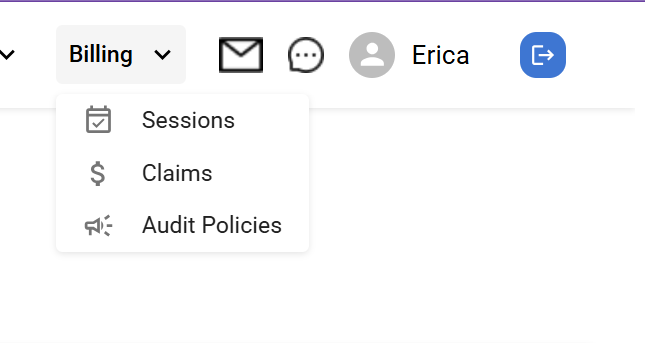
Here’s what ABA billing isn’t: it’s not standard medical billing with different codes. Rather, it has structural complexity that generic billing tools simply can’t handle well. That’s why you’re likely getting error codes and mismatches that send your team into a tizzy.
ABA services, as you know, are session-based, time-driven, and governed by strict payer rules. A single day at the clinic can mean multiple staff engagements, authorizations, and supervision.
And each variable affects whether a claim is valid or not.
Unlike traditional medical billing, ABA billing demands:
When your clinic relies on manual checks or generic systems, you’re more likely to get denials. These systems don’t have the logic you need to enforce ABA-specific rules consistently.
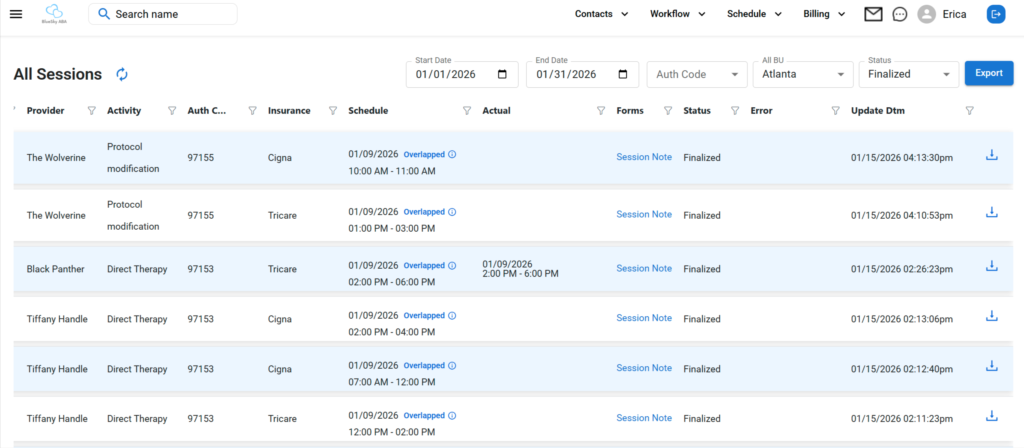
The bottom line is this: clean claims result from workflow design. Why?
Because errors usually show up long before you submit your claims.
Here’s what your workflow should look like, in order:
Every claim begins with the data from the session. Clinics have to be able to capture:
Any time you’ve got incomplete or inconsistent session data, you increase your risk of billing errors.
It’s also important to remember that your documentation has to support what occurs during each session.
This includes:
When your documentation sits outside of the billing workflows, your staff will only find issues once they’ve gotten an error message. And then they’re backtracking and playing catch-up.
Billing readiness means that a session can be billed legally and contractually.
When your staff checks for billing readiness, they should verify:
If you don’t have this process automated, your teams are left relying on memory or spreadsheets.
Once you’ve captured all your data and you’ve run billing readiness checks, you’re ready to submit claims.
Of course, claims must meet payer and clearinghouse requirements.
Clean exports depend on:
When you try to do this manually, you end up dealing with export fixes, which slow down the reimbursement. And your team gets burned out… fast.
Now, after submission, your billing team will need clear visibility.
They’ll have to track:
Without a centralized tracking system, your staff will find themselves constantly reacting out of sheer inefficiency.
Most ABA billing errors fall into the most predictable categories:
The core issue is pretty consistent. You’re trying to fix problems after submission instead of preventing them beforehand. The fastest way to change this pattern is to move error detection upstream.
Billing software for ABA clinics allows your billing team to validate session data at the point of entry. They’ll also be able to enforce payer-specific billing rules before creating claims and audit readiness claims.
What they won’t be doing is manually scrubbing.
A quick word on overlapping codes because it’s such a common issue in ABA billing. This issue arises every time two services are billed for the same time. And it’s a violation of some payer rules.
A common example involves 97153 and 97155. Many payers restrict how these services overlap. If your clinic fails to detect overlaps early, the payer may either only partially pay you or deny your claim altogether.
Plus, manual overlap checks don’t scale.
So ABA therapy billing software has to be able to audit time-based services automatically by payer.
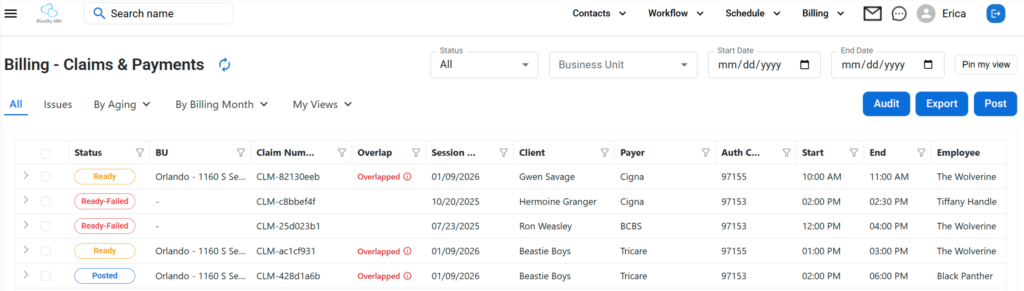
In the end, submitting claims is the bare minimum. Modern ABA billing software has to prevent errors upstream.
The most effective software should:
It’s here that billing workflows integrate with ABA practice management software while still protecting billing compliance independently.
Here are the seven features any ABA billing software you choose must have in order to work effectively for your clinic:
What It Is: A rules engine applies billing logic based on each payer’s requirements, not just generic defaults.
Why It Matters: Each payer will interpret ABA codes in their own way. One global rule set leads to denials that could have been prevented.
How to Evaluate It:
What It Is: These audits are automated checks that will confirm a claim is complete and compliant before you submit it.
Why It Matters: Having your team perform manual scrubbing is a time suck that still results in missed errors.
How to Evaluate It:
What It Is: Automated detection of time-based service overlaps that violate payer rules.
Why It Matters: Overlapping codes are the most common reasons for denials.
How to Evaluate It:
What It Is: This feature centralizes management of payer-specific reimbursement rates.
Why It Matters: Any time you have missing or incorrect rates, you risk underbilling, overbilling, and denials.
How to Evaluate It:
What It Is: The software will format your claim exports for your payers or a clearinghouse.
Why It Matters: Formatting errors will cause delays in payments and require your team to do additional work.
How to Evaluate It:
What It Is: You should be able to track your claims in real time from the moment of submission until you receive payment.
Why It Matters: Without visibility, your billing team will be operating reactively.
How to Evaluate It:
What It Is: You need reports that surface trends, not just totals.
Why It Matters: Leadership must have insight into root causes and cash flow timing.
How to Evaluate It:
When it comes right down to it, scheduling and billing are separate issues under the same umbrella.
Scheduling exists so you can deliver care. Billing exists so you can protect your revenue and stay in compliance.
When you create a system wherein scheduling rules drive billing decisions, you risk:
When you have separate billing logic, however, you can create objective audits, even when the schedules appear valid.
This separation is at the core of purpose-built ABA clinic software.
In reality, the best way to evaluate any ABA billing software is to see how the features all work together in real time.
Our founder, Erica Kinnebrew, designed ABA Engine to meet these exact requirements. We separate billing logic from scheduling, so you’ll audit your claims before submission. And you’ll always give your billing team full visibility… without a bunch of manual rework.
The result?
Fewer denials, faster reimbursement, and less administrative strain.
Ready to get started today?
You can make these changes today and start reducing denials:
Thanks to automation, these improvements are both sustainable and scalable. So your clinic can grow without leaving your upgrades behind.
Clean claims don’t come from heroic billing efforts. They come from systems that prevent errors before submission.
The right ABA billing software reduces rework, improves your cash flow, and supports compliance.
And it won’t slow down your delivery of care.
Book a demo now to see how ABA Engine can help you prevent denials before you submit.
ABA billing software helps clinics manage session data, apply payer rules, create claims, and track reimbursements. And you’ll stay compliant all the while.
It cuts way down on claim denials by enforcing payer rules and auditing claims before you submit them. It will flag any errors, so your team can revisit the claim, like missing data or overlaps.
While shopping for your ABA billing software, look for payer-specific rules, claim audits, overlap detection, rate management, clean exports, and real-time visibility.
Yes! Purpose-built systems like ABA Engine support payer logic that can vary by contract, service, and authorization.
Your ABA clinic can be up and running in just a few weeks. Of course, how quickly or slowly your setup happens will depend on the complexity of your data.